
Photo selection guide

How to choose the best photos for custom photo magnets.

The best magnet photo is not always the most professional one. It is the photo where the people, pet, place, or moment you care about is easy to see and still feels like you.

2.5-inch magnets Square crop tips Phone photos welcome 1, 3, 6, or 12 photos
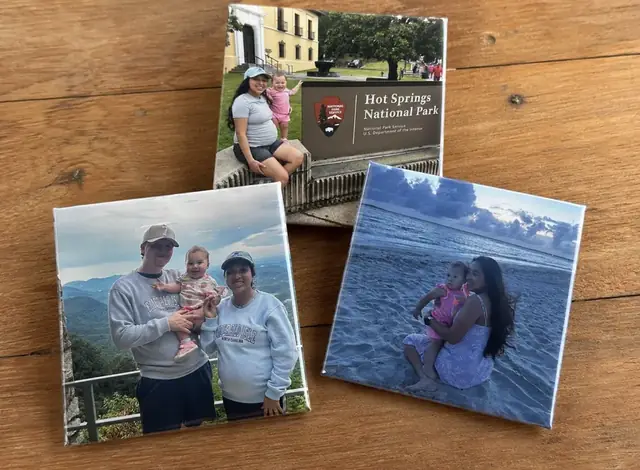
Custom photo magnets showing a mix of family photo memories
Start here

Start with the memory, then check the photo.

A favorite candid can make a better keepsake than a perfectly posed picture if the subject is clear and the moment means something to you.

For Magnetic Gems' standard 2.5-inch photo magnets, the most important practical checks are simple: make sure the photo is clear, bright enough to see, and gives the important parts of the image room for a square crop.

If you have several good options, think about the set as a tiny photo story instead of choosing six nearly identical pictures. A mix of close-ups, family moments, milestones, pets, or everyday memories can make the finished set feel more personal.

1. Clarity

Choose a photo where the subject is easy to see.

A photo magnet is small by design, so a strong image usually has an obvious subject. Close family photos, portraits, pets, couples, babies, and cap-and-gown pictures tend to read more clearly than scenes where the people are tiny in the frame.

You do not need a professional camera. A clear phone photo can work very well. What matters most is that the photo is not noticeably blurry, extremely dark, or so distant that the important part disappears at magnet size.

  • Good choice: a child filling most of the frame with a little space around the head and shoulders.
  • Good choice: a family group where everyone is visible and faces are not pressed against the edge.
  • Needs a second look: a wide crowd photo where the person you care about is only a tiny part of the image.
2. Crop

Leave room for a square crop.

Magnetic Gems' standard photo magnets are square. A tall portrait or wide landscape photo may need some cropping to fit that shape, so the safest photos have a little breathing room around faces, hands, names, dates, and other details you want to keep.

If a specific crop matters, add a note with your order. For example, you can ask to keep a graduation cap visible, avoid cutting off a bouquet, or keep two people together in the frame.

  • Portraits: leave some space above the head and around the shoulders.
  • Group photos: choose one where people are not touching the left and right edges.
  • Landscapes: make sure the meaningful part is near the center instead of only at one far edge.
  • Photos with text: keep names and dates comfortably inside the image, not against the border.
3. File quality

Use the original photo when you have it.

Original photos are usually the best starting point because they preserve more detail than a screenshot, social-media save, or image that has been forwarded multiple times.

Screenshots can sometimes work, especially when they are the only copy you have, but look closely before uploading. If the faces already look soft or pixelated on your phone, the original file is worth finding when possible.

  • Prefer the original camera-roll image over a screenshot of the image.
  • Avoid zooming in and re-saving a tiny part of a photo before upload.
  • If an older family photo is your only copy, use the clearest version you have instead of skipping a meaningful memory.
4. Build the set

Choose photos that work together without all looking the same.

A magnet set can feel like a miniature album. Instead of selecting several nearly identical shots from one moment, choose photos that add something different to the story.

For a family gift, that might mean one close-up of each child, one full-family picture, a pet photo, and a favorite candid. For a graduation set, you might mix a senior portrait, cap-and-gown photo, family picture, school memory, and celebration photo.

  • 1 magnet: choose the single photo that instantly represents the memory.
  • 3 magnets: build a tight mini-set around one person, pet, trip, or milestone.
  • 6 magnets: mix close-ups, group photos, and a few candid moments for a balanced set.
  • 12 magnets: create a fuller timeline, family collection, event set, or gift bundle.
5. Occasion ideas

Photo ideas when you are not sure what to pick.

Sometimes the hardest part is not photo quality; it is narrowing down a camera roll with hundreds of good memories. Start with the person receiving the magnets and choose the images they will be happiest to see often.

For parents and grandparents

Mix recent family photos with a favorite older memory, a grandchild close-up, siblings together, and one candid that feels unmistakably like your family.

For babies and young families

Sonograms, newborn photos, monthly milestone pictures, first holidays, and parent-and-baby photos can turn a small magnet set into a simple timeline.

For weddings and anniversaries

Engagement photos, a favorite wedding portrait, candid reception moments, detail shots with meaning, and a photo of the couple with family all work well together.

For graduations

Try a senior portrait, cap-and-gown photo, family picture, school or team memory, and a celebration photo instead of repeating one pose across the whole set.

For pets

Close-ups where the eyes and face are clear usually read well at magnet size. Mix a favorite portrait with a funny pose or a photo that captures the pet's personality.

For memorial keepsakes

Choose a photo that family members immediately recognize and love. A clear portrait is often a strong choice, but a meaningful candid can be just as special when it captures the person naturally.

Before checkout

Your final upload checklist.

Before you start your order, take one last look at the full set. The goal is not technical perfection. It is making sure every photo has a clear purpose and gives the important parts enough room to become a small square keepsake.

  • Open each photo and make sure it is not blurry or unusually dark.
  • Check that no face, name, date, cap, bouquet, or other must-keep detail sits directly on an edge.
  • Use original files where possible instead of screenshots.
  • Remove near-duplicates unless repeating a photo is intentional.
  • Add order notes if a specific crop or duplicate pattern matters.
  • Upload up to the number of magnets in your chosen pack.
After you choose your photos

Choose a pack after you choose your photos

Magnetic Gems' standard photo magnets are 2.5 inches. Upload up to the number of magnets in your pack, or use order notes when you want a photo repeated.

6 Photo Magnets

The best-selling pack for a balanced family or gift set.

$22Choose this pack
12 Photo Magnets

The best-value pack for a larger memory collection.

$35Choose this pack
Questions

Photo selection questions

A few practical answers before you upload your photos.

Can I use photos taken on my phone?

Yes. Clear, bright phone photos can work well for custom photo magnets. Use the original camera-roll photo when possible.

Can I use a screenshot for a photo magnet?

Sometimes. Screenshots can print softer than the original image, so use the original photo when you have it. If a screenshot is your only copy, upload the clearest version available.

What if my photo is not square?

Most standard Magnetic Gems photo magnets are square, so some cropping may be needed. Choose photos with breathing room around faces and important details, and add an order note if a specific crop matters.

Can I repeat the same photo on more than one magnet?

Yes. Upload the photo and use your order notes to explain how many copies you want or which photos should repeat.

How many photos should I upload?

Upload up to the number of magnets in your pack: 1, 3, 6, or 12. If you want duplicates, explain the repeat pattern in the order notes.